Connection Thunderbolt 4
Displays Up to 4
Power 96W PD
Driver DisplayLink
This page contains affiliate links. We may earn a commission at no extra cost to you. Read our affiliate disclosure.
 By Adrian Cel
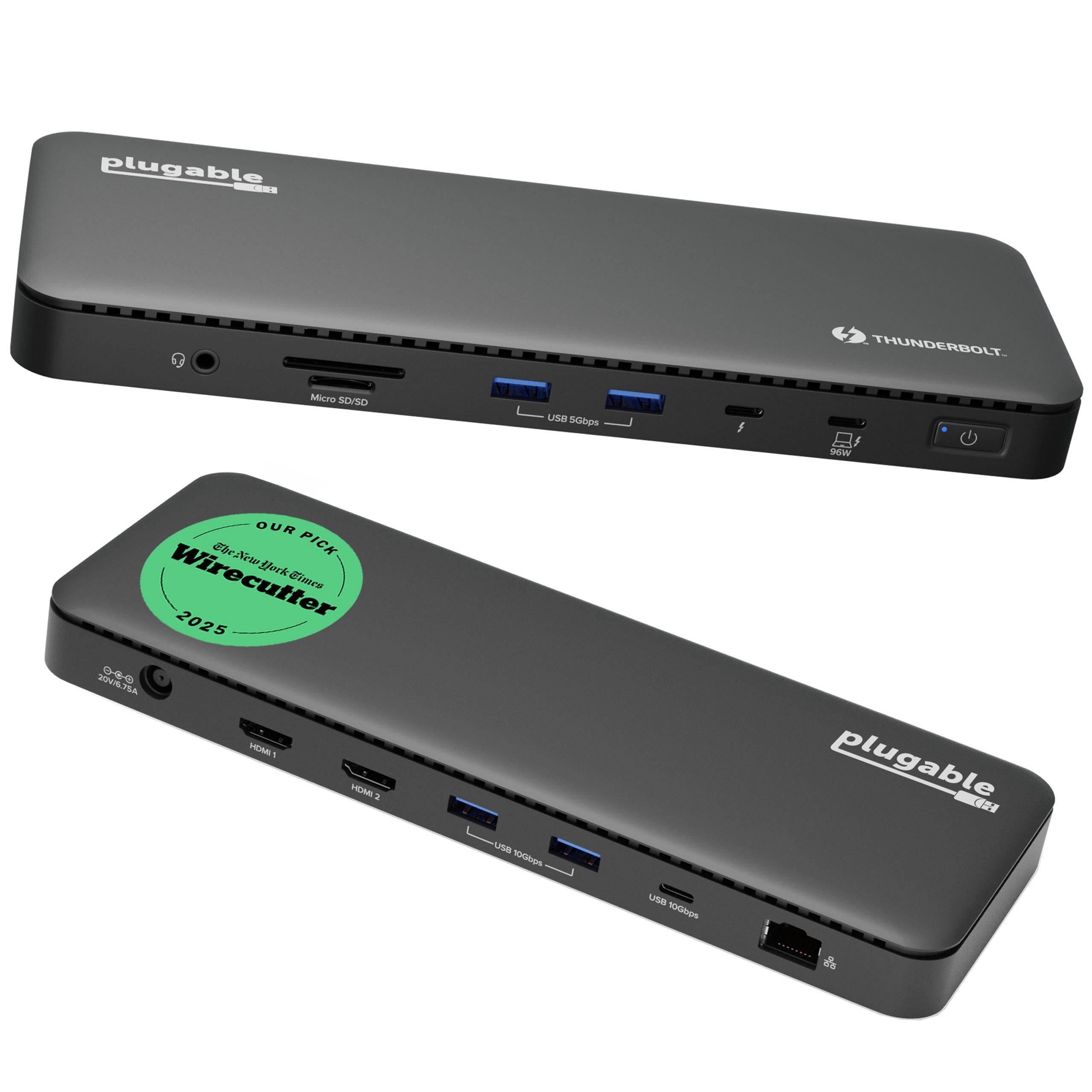
The Plugable TBT-6950PD is a Thunderbolt 4 dock for desks where the display count matters more than having every possible legacy port. It combines one upstream Thunderbolt 4 host connection, three downstream Thunderbolt 4 ports, and two HDMI 2.0 outputs powered by DisplayLink. That mix lets the dock drive up to four 4K@60Hz displays when the host and software support it: two displays through Thunderbolt and two through HDMI. Plugable lists 100W laptop charging, with the certified host output stated as 96W, plus 15W charging from each downstream Thunderbolt port. The rest of the port layout is focused but useful: two 10Gbps USB-A ports, Gigabit Ethernet, a UHS-II SD reader, and a 3.5mm audio jack. The DisplayLink part is the catch. The HDMI ports need DisplayLink software on Windows or macOS, and macOS users must grant Screen Recording permission before those screens work correctly. For MacBook owners trying to push beyond Apple's native display limits, that tradeoff may be worth it. Base M1 and M2 Macs can reach up to three external displays, while supported Pro/Max chips, base M4/M5, and base M3 in clamshell mode can reach four.
Workaround: Install DisplayLink Manager before relying on the HDMI ports. On macOS, approve Screen Recording permission for DisplayLink Manager.
Workaround: Use a USB or Thunderbolt 2.5GbE adapter if your network is faster than 1Gbps.
Workaround: Use one downstream Thunderbolt port for a USB-C hub if you need more low-speed accessories.
Workaround: Use a Pro/Max Mac, base M4/M5, or base M3 in clamshell mode if four displays are required.
Workaround: Use Thunderbolt outputs for latency-sensitive or color-critical screens, and reserve DisplayLink HDMI for office monitors.
Workaround: Keep the dock in open air and avoid stacking it under papers or behind another hot device.
| General | |
| Manufacturer | Plugable |
| Model | TBT-6950PD |
| Release Date | 2024-10 |
| MSRP | $319.99 |
| Connectivity | |
| Host Connection | Thunderbolt 4 |
| Max Data Rate | 40 Gbps |
| Driver Required | DisplayLink |
| Display Output | |
| Max Displays | 4 |
| 1x Display | 7680x4320 @ 30Hz (Plugable lists single 8K display support through Thunderbolt/USB-C display output when the host system, display, and cable support it.) |
| 2x Display | 3840x2160 @ 60Hz (Two 4K@60Hz displays can run through the downstream Thunderbolt ports, the HDMI DisplayLink ports, or a mixed setup depending on the host.) |
| 3x Display | 3840x2160 @ 60Hz (Base M1 and M2 Macs, and many ChromeOS systems with Thunderbolt 4 or USB4, are limited to three extended displays according to Plugable's compatibility notes.) |
| 4x Display | 3840x2160 @ 60Hz (Up to four 4K@60Hz displays using 2x HDMI with DisplayLink plus 2x Thunderbolt/USB-C display outputs. Base M3 Macs need clamshell mode for four displays; Pro/Max chips and base M4/M5 are better fits.) |
| Ports (10+ total) | |
| USB-A 3.2 | 2x (4.5W) |
| USB-C 4.0 | 3x (15W) |
| HDMI 2.0 | 2x |
| Thunderbolt 4 | 3x |
| Ethernet (RJ45) | 1x 1 Gbps |
| Audio (3.5mm-combo) | 1x |
| SD Card Reader | 1x |
| Power | |
| Power Input | DC-barrel |
| Laptop Charging | Up to 96W |
Compatible with Windows 10 and later on computers with Thunderbolt 4 or USB4 support. DisplayLink software is required for HDMI outputs, usually installed automatically on Windows.
Compatible with macOS 11 and later on Thunderbolt 4 or USB4 Macs. DisplayLink Manager must be installed manually for HDMI outputs, and macOS requires Screen Recording permission.
Plugable lists ChromeOS 128 and later support for Thunderbolt 4 or USB4 Chromebooks, with up to three extended displays. Most USB-C-only Chromebooks are not supported.
Limited to three external displays
Four-display mode requires clamshell mode
Not supported
No DisplayLink HDMI support
Excellent
The Plugable TBT-6950PD is best understood as Plugable's Satechi-style hybrid dock: real Thunderbolt 4 bandwidth for storage, USB-C displays, and daisy chaining, plus DisplayLink HDMI outputs for extra monitors. Macworld gave it an Editors' Choice rating and liked the four-display flexibility, 11 fast ports, and 180W power supply, while still calling out the obvious limits: base M1 and M2 Macs stop at three displays, and the dock is mostly a North American product. Compared with Plugable's TBT4-UD5, this model costs more and requires driver software, but it adds two more possible displays and two extra downstream Thunderbolt ports. Compared with the older TBT4-UDZ, it loses 2.5GbE, DisplayPort, and the larger 16-port layout, but it is better for Mac users who need more than two displays because it uses DisplayLink instead of relying only on MST. The weakest points are Gigabit Ethernet, only two USB-A ports, and the need to install and maintain DisplayLink Manager. It can also run warm when charging and driving several monitors, which Plugable says is normal for the aluminum chassis. If you only need one or two screens, buy a driverless Thunderbolt dock. If you need three or four office displays from a modern Mac or Windows laptop and still want downstream Thunderbolt ports, the TBT-6950PD is one of the cleaner options.

A practical comparison of the Plugable TBT-6950PD and Plugable TBT4-UDX1 Thunderbolt 4 docks, covering display count, DisplayLink, downstream Thunderbolt ports, Ethernet, USB, charging, and value.
A practical comparison of the Satechi Thunderbolt 4 Multi-Display Docking Station and Plugable TBT-6950PD for four-monitor Thunderbolt 4 and DisplayLink desks.